How Forms Send Data
Web forms are the bridge between users and web applications. They collect information in the browser and send it to a server, where it can be processed, stored, or used to trigger actions. Understanding how forms send data is essential for building reliable and secure web experiences.
What Is an HTML Form?
An HTML form is a structured area on a web page that allows users to input data. It might include text fields, checkboxes, radio buttons, select menus, file uploads, and buttons. When the user submits the form, the browser packages the data and sends it to a destination, usually a server endpoint.
The behavior of a form is controlled mostly by attributes on the <form> element, especially action, method, and enctype.
The Key Form Attributes
The action Attribute
The action attribute tells the browser where to send the form data. It is usually a URL that points to a server route, API endpoint, or script that will process the data.
- If
actionis provided, the browser sends data to that specific URL. - If
actionis omitted, the data is sent to the same URL as the current page.
The method Attribute
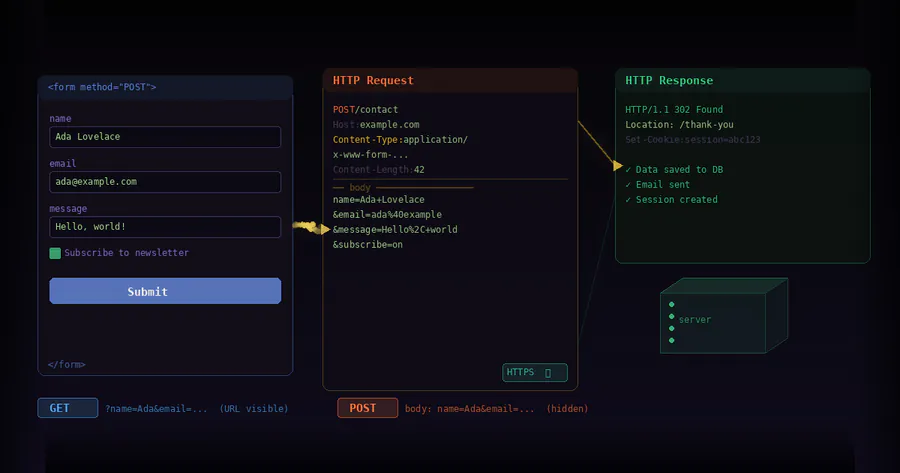
The method attribute controls how the browser sends the data to the server, most commonly using HTTP GET or POST.
- GET: Form data is appended to the URL as a query string (for example,
?name=Alex&age=30). This is suitable for simple searches or filters where data is not sensitive. - POST: Form data is sent in the body of the HTTP request, not in the URL. This is preferred for sensitive data (like passwords) or large payloads.
Other HTTP methods (like PUT, PATCH, DELETE) are sometimes used via JavaScript or special server configurations, but native form submissions typically use GET and POST.
The enctype Attribute
The enctype attribute defines how the form data is encoded before being sent. It matters most when dealing with file uploads or non-text data.
application/x-www-form-urlencoded(default): Data is URL-encoded as key-value pairs. This is used for most regular forms.multipart/form-data: Used when a form includes file uploads. Text fields and file contents are sent as separate parts in a single request.text/plain: Sends plain text without encoding; rarely used in production due to lack of structure and reliability.
How the Browser Builds Form Data
When a form is submitted, the browser examines all of its submittable controls and converts them into a set of key-value pairs. The keys are determined by the name attributes, and the values come from the user input.
The Role of the name Attribute
Only inputs with a name attribute are included in the submission. The id attribute is not used for sending data; it is only for labeling and scripting. For example:
- If an input has
name="email", the server will receive a field calledemail. - If an input is missing a
name, its value will not be sent at all.
Different Input Types and Their Values
Various form controls contribute to the data set in different ways:
- Text fields (
text,email,password, etc.): The value is whatever the user typed. - Checkboxes: Included only if checked. The value is taken from the
valueattribute; if that is omitted, a default value likeonmay be used by the browser. - Radio buttons: Only the selected radio button from a group (same
name) is sent, with itsvalue. - Select menus: For a single-select list, the selected option’s value is sent. For multiple-select lists, multiple values with the same name may be sent.
- File inputs: When using
multipart/form-data, the uploaded file’s binary contents and metadata (like filename) are included under the file input’s name. - Hidden inputs: Values are included even though users do not see them, useful for including IDs, tokens, or context.
GET vs POST in Practice
When Data Goes in the URL (GET)
With method="get", the browser builds a query string from the form data and appends it to the action URL. Each key-value pair is URL-encoded and separated by &.
- The URL can be bookmarked or shared, preserving filter or search parameters.
- There is a practical limit to how much data can fit comfortably in a URL.
- Because data is visible in the URL, it should not be used for passwords, tokens, or private details.
When Data Goes in the Request Body (POST)
With method="post", the data is put into the body of the HTTP request. It is not visible in the URL, although it can still be seen in browser developer tools or logs.
- Suitable for larger or more complex payloads, such as multi-step forms.
- Preferred for actions that change data on the server: creating accounts, placing orders, submitting comments.
- Often used with
multipart/form-datawhen handling file uploads.
Server-Side Handling of Form Data
Once the browser sends the data, the server receives the request at the URL specified in the action attribute. A server-side program or route parses the incoming data and makes it available for further processing.
- For
application/x-www-form-urlencoded, the body is parsed into a dictionary or map of keys and values. - For
multipart/form-data, the server parses each part, separating text fields from file uploads. - For
GETrequests, the query string is parsed into key-value pairs.
After parsing, the application can validate the input, interact with a database, send emails, or return a response (HTML, JSON, redirects, and so on).
Validation and Error Handling
Validation ensures that the data sent by a form is complete, in the correct format, and safe to use.
Client-Side Validation
HTML5 introduces built-in validation features:
requiredattributes ensure that certain fields are not left empty.- Input types like
emailandurlenforce basic formatting rules. - Attributes like
pattern,min, andmaxprovide more fine-grained constraints.
This validation runs in the browser before the form is submitted, improving user experience by catching obvious errors early.
Server-Side Validation
Even if client-side validation passes, the server must still validate incoming data because:
- Users can disable or bypass client-side checks.
- Automated scripts or malicious actors might send crafted requests.
- Server-side rules may be more complex than what HTML alone can express.
Security Considerations When Sending Form Data
Any time data moves between browser and server, security must be taken into account.
Use HTTPS
HTTPS encrypts data in transit so that attackers cannot easily read or modify it. Logins, payments, and personal information must always be sent over HTTPS, but in practice, all pages should use it.
Protect Against CSRF
Cross-Site Request Forgery (CSRF) occurs when a malicious site tricks a user’s browser into submitting a form to another site where they are logged in. Common protections include:
- CSRF tokens embedded in forms and validated on the server.
- SameSite cookies to limit when browsers send cookies.
Sanitize and Escape Input
Data received from forms should never be trusted blindly.
- Sanitize input to remove or normalize unexpected characters.
- Escape output when displaying data in HTML, JavaScript, or SQL contexts to prevent cross-site scripting (XSS) and injection attacks.
Forms, JavaScript, and AJAX
Traditional form submissions cause a full page reload as the browser navigates to the action URL. Modern applications often use JavaScript to intercept the submission and send data asynchronously (AJAX).
- JavaScript can gather the same form data that a normal submission would send.
- Instead of navigating away, JavaScript sends the data using APIs like
fetchorXMLHttpRequest. - The server responds, usually with JSON, and the page updates dynamically without a full reload.
Despite this difference in experience, the underlying principles are similar: user inputs become key-value pairs, sent over HTTP to a server that interprets them.
Putting It All Together
When a user interacts with a form and clicks submit, a series of well-defined steps occur:
- The browser gathers values from all submittable, named form controls.
- It encodes this data based on the chosen HTTP method and
enctype. - The data is sent to the URL in the
actionattribute as part of an HTTP request. - The server parses the incoming data, validates it, and performs application-specific logic.
- The server sends back a response, such as a new page, a redirect, or a data payload for client-side scripts.
Understanding how forms send data gives you control over how users interact with your application, how information flows to your server, and how to keep that process secure and reliable.

