What Is Version Control?
Version control is a system for tracking and managing changes to files over time. It records what changed, who changed it, and when it changed, allowing individuals and teams to work on the same project without losing work or overwriting each other’s contributions.
Why Version Control Matters
Without version control, keeping a project organized quickly becomes difficult. People often end up with folders full of files named like final_v3_really_final. This approach is error-prone and makes it hard to answer basic questions such as:
- What exactly changed between last week and today?
- Who introduced this bug or feature?
- How do we go back to the last working version?
- How can multiple people edit the same file safely?
Version control tools solve these problems by keeping a structured history of a project, enabling collaboration, and making it easy to experiment without risk.
Centralized vs Distributed Version Control
There are two broad categories of version control systems:
Centralized Version Control
In centralized systems, there is a single, central server that stores the project history. Each user connects to this server to get the latest changes and submit their own updates. While this model is simple, it depends heavily on constant access to the central server.
Distributed Version Control
Distributed systems, like Git, give every user a full copy of the project history. Developers work locally and only need to connect to a shared server when they want to sync changes with others. This approach is more resilient and flexible, especially for large or distributed teams.
What Is Git?
Git is a distributed version control system that has become the standard tool for tracking changes in software projects and many other types of work, such as documentation, configuration files, and even design assets in text form.
Git was designed to be fast, reliable, and capable of handling projects of all sizes. Its core idea is to treat your project’s history as a series of snapshots, each snapshot representing the state of your files at a specific moment.
Key Concepts in Git
Repository
A Git repository (often called a “repo”) is the database where Git stores your files and their entire history. A repository can live locally on your computer or on a remote server such as GitHub, GitLab, or Bitbucket.
Commits
A commit is a recorded snapshot of your project at a point in time. Each commit contains:
- The set of changes you made (what was added, modified, or deleted).
- The author information (who made the change).
- A timestamp (when it was made).
- A message describing the change (why it was made).
By creating commits regularly, you build a detailed, searchable history that you can explore, compare, and even roll back if needed.
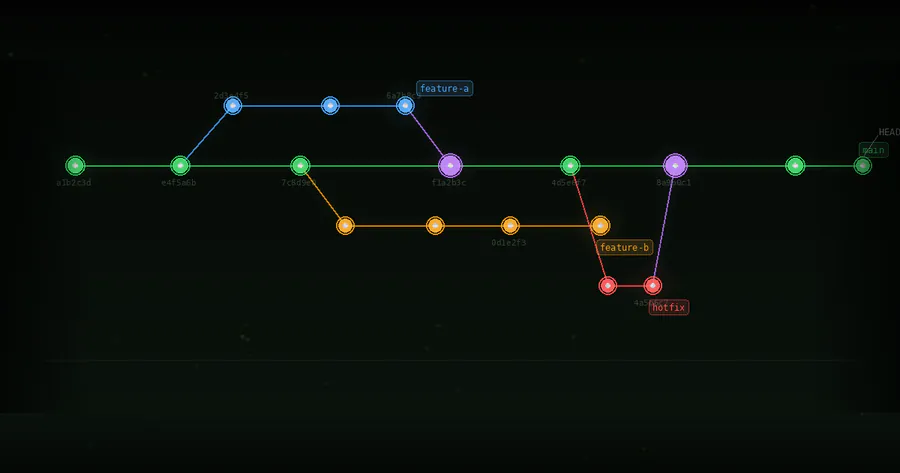
Branches
A branch is a separate line of development. You can think of it as an independent timeline of commits. Branches allow you to:
- Work on new features without affecting the main project.
- Experiment safely and discard changes if they do not work out.
- Develop multiple ideas in parallel.
Typically, a project has a main or primary branch that reflects the stable, production-ready version of the project. Other branches are created for features, bug fixes, or experiments.
Merging
Merging is how Git combines changes from one branch into another. When a feature is finished, its branch is merged back into the main branch so that the feature becomes part of the official project history. Git attempts to automatically blend the changes. If the same part of a file was edited differently in multiple branches, Git alerts you to a conflict that you must resolve manually.
Remote Repositories
Remote repositories are shared copies of your project hosted on servers. They act as a central meeting point for your team. You send your local commits to a remote repository and receive others’ changes from it. This is how Git supports collaboration across locations and time zones.
How Git Helps Track Changes
Complete Project History
Git stores a complete history of your project, not just the latest version. You can review how a file changed over time, step through earlier versions, and inspect who made each change and why. This level of detail is invaluable for debugging, audits, and learning from past decisions.
Detailed Change Tracking
For each commit, Git can show you a line-by-line comparison of what changed. This makes it easier to:
- Spot bugs introduced in recent changes.
- Understand how a feature was implemented.
- Review and discuss proposed changes during code reviews.
Safe Experimentation
Because creating and switching branches in Git is fast and inexpensive, you can experiment freely. If an idea fails, you can simply delete the branch without affecting the main project. If it succeeds, you merge it in and it becomes part of the official history.
Reverting and Recovering
Git makes it easy to undo mistakes. If a commit introduces a problem, you can revert it, restoring the project to a previous state while preserving the full history of what happened. If files are accidentally deleted or severely modified, you can retrieve them from earlier commits.
Collaboration with Git
Git is especially powerful in team environments, where many people contribute to the same project.
Working in Parallel
Multiple team members can create their own branches, work independently, and then merge their work. This reduces bottlenecks and avoids overwriting each other’s changes.
Code Review and Quality Control
When used with platforms like GitHub or GitLab, Git supports pull requests or merge requests. These are proposals to merge changes from one branch into another, usually the main branch. Teammates can review the changes, discuss them, request modifications, and approve them before they become part of the main project.
Traceability and Accountability
Each commit is associated with an author and a message. Over time, this creates transparent traceability: you can see who changed what and understand the reasoning behind significant modifications. This is helpful both for technical reasons and for project management.
Beyond Code: Other Uses of Git
Although Git was created for source code, it is useful for many types of projects where change tracking matters:
- Documentation and technical writing.
- Configuration files and infrastructure definitions.
- Data analysis scripts and notebooks (when stored in text-friendly formats).
- Curriculum development, research papers, and collaborative writing.
Any project that benefits from history, collaboration, and controlled change can use Git effectively.
Getting Started with Git
To start using Git in a project, you generally follow these steps:
- Install Git on your computer.
- Initialize a repository in your project folder.
- Add files to be tracked by Git.
- Create commits with clear, descriptive messages.
- Optionally connect your local repository to a remote service.
- Use branches for features and merge them back when ready.
As you grow more comfortable with these basics, you can explore more advanced features like tagging releases, rebasing branches, and integrating Git into automated workflows.

